Clearly not the happiest topic, but there was an interesting article in the Telegraph about how flickr, twitter and blogs spread the news of the terrorist events in Mumbai.
The same sort of thing was seen in the Californian bushfires, and I dare say the Thai blogs are full of news from inside Bangkok International airport.
The point is that the technology makes it simple to get the information out and enable the viral spread of news. It's not journalism, it's information, and while there are risks in rumours, misreports and too many reports overwhelming people it provides a channel to get the information out. No more can bad things happen behind closed doors - as we see in the rise of social media in China, or the Burmese governments hamfisted attempts to block uploads of mobile phone footage. If the death of privacy also means the end of secrecy that might be a deal worth living with
Friday, 28 November 2008


Wednesday, 26 November 2008
It's the interface stupid
Over the past few months I've been blogging about things like Zonbu and Easy Neuf, building a whole range of linux vm's, installing linux on old ppc imacs and also playing with a little Acer Aspire One I've got on loan.
Building the imacs was useful - it demonstrated just how little cpu and memory you needed to run a desktop to do the standard things - a bit of text processing, web mail, google docs, and in my case a usenet news reader for the two posts a week I'm interested in. I'm now convinced that an eight year old machine can make a perfectly useful web centric device.
Likewise having built various vm's I've come to the conclusion that gnome and xfce are usable windows managers. Fluxbox and IceWM, both of which work and use even less in the way of resources than xfce are uable, but their a bit rough round the edges, and the desktop manager needs to be slick. Apple did this with aqua and convinced a whole lot of people that unix on the desktop was a viable option precisely by not mentioning unix and hiding it behind a nice interface. Microsoft to an extent tried to sell Vista on the idea that it had a slicker look than the XP interface, and of course we all know that the version gnome that ships with ubuntu has more than a passing resemblance to XP.
Interfaces need to be intuitive, and while they can be different from what people are used to they can't be too different - and everyone knows xp.
And that takes us to the Acer Aspire. A fine machine - so fine I might even buy one, but the interface, based on xfce is dumbed down - so dumbed down it doesn't look like a 'real' operating system, and consequently makes the xp version of he aspire look like a 'proper computer'.
Run xfce natively and it looks like a 'real' machine. The functionality is exactly the same, the applications work the same, but the interface makes it look second rate.
Now linux has a scary reputation out there involving beards sandals and unfortunate trousers. As I said, Apple got away with things by not mentioning that OS X is really BSD, so I'm guessing Acer decided that using Linpus was simple and wouldn't have a support load - the fact that if you want to do something sensible, like install skype, you're back playing with the command line shows that its dumbed down too far - a simple version of xfce (or fluxbox - after all if you can develop linpus you hve the resources to sleek up fluxbox) would have been better.
It makes it look like a real computer - and that's want people want, they want to look different, not a freak.
Building the imacs was useful - it demonstrated just how little cpu and memory you needed to run a desktop to do the standard things - a bit of text processing, web mail, google docs, and in my case a usenet news reader for the two posts a week I'm interested in. I'm now convinced that an eight year old machine can make a perfectly useful web centric device.
Likewise having built various vm's I've come to the conclusion that gnome and xfce are usable windows managers. Fluxbox and IceWM, both of which work and use even less in the way of resources than xfce are uable, but their a bit rough round the edges, and the desktop manager needs to be slick. Apple did this with aqua and convinced a whole lot of people that unix on the desktop was a viable option precisely by not mentioning unix and hiding it behind a nice interface. Microsoft to an extent tried to sell Vista on the idea that it had a slicker look than the XP interface, and of course we all know that the version gnome that ships with ubuntu has more than a passing resemblance to XP.
Interfaces need to be intuitive, and while they can be different from what people are used to they can't be too different - and everyone knows xp.
And that takes us to the Acer Aspire. A fine machine - so fine I might even buy one, but the interface, based on xfce is dumbed down - so dumbed down it doesn't look like a 'real' operating system, and consequently makes the xp version of he aspire look like a 'proper computer'.
Run xfce natively and it looks like a 'real' machine. The functionality is exactly the same, the applications work the same, but the interface makes it look second rate.
Now linux has a scary reputation out there involving beards sandals and unfortunate trousers. As I said, Apple got away with things by not mentioning that OS X is really BSD, so I'm guessing Acer decided that using Linpus was simple and wouldn't have a support load - the fact that if you want to do something sensible, like install skype, you're back playing with the command line shows that its dumbed down too far - a simple version of xfce (or fluxbox - after all if you can develop linpus you hve the resources to sleek up fluxbox) would have been better.
It makes it look like a real computer - and that's want people want, they want to look different, not a freak.
Tuesday, 25 November 2008
OpenSolaris 2008.11 RC2
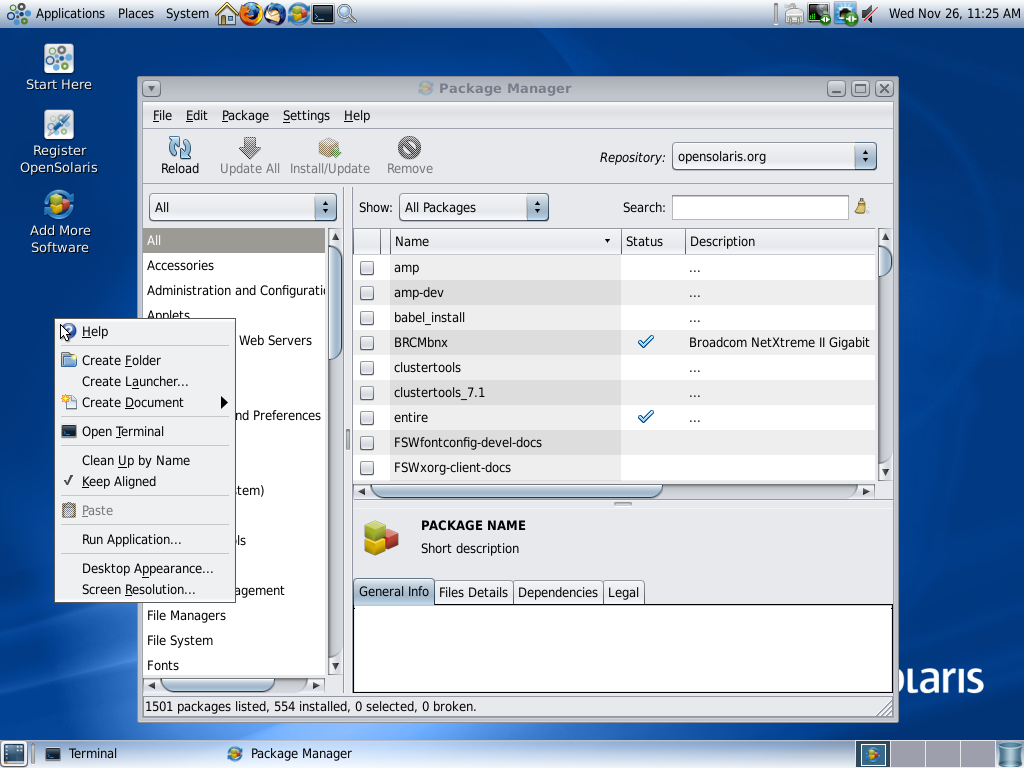
Way back in May, I built an open solaris install using 2008.05 on virtualbox.
And after some pfaffing around it worked pretty well, even if t was just another unix desktop. Could have been Suse, could have been Fedora. Six months later and, while it's still only rc2 and not the final distribution version I decided to have a go building 2008.11. This is not a like for like comparison, while I'm again building it on VirtualBox I'm now using version 1.6 and there's always the possibility that Sun have improved its ability to run OpenSolaris distros.
The live cd image booted cleanly, and the Installer to install the system to disk was clean, self evident, and runs well, and seems slicker than the previous version and was reasonably quick, with no errors encountered. Ignoring the false start caused by my forgetting to unmount the cd image, the boot process was fairly slick and professional looking with a single red line in a rotating slider to let you know things were still going on (that and the hdd light). Like many modern distros there was little or no information about what was happening during the process (personally I like the reassurace of the old startup messages).
The boot and login process was utterly uneventful, with the vm connecting strisght to the network (unlike the slightly annoying debian and suse extra mouseclick). The default software install was utterly standard and gnome like, and again open office was not installed by default - probbably because it won't fit onto the distribution disk.
The package installer is noticably slicker with more software available and is intuitive to use.
Generally, it looks and feels faster than the previous 2008.05 distro and somehow looks more polished and professional. Definitely worth trying and building on a 'real' pc. Like Suse it probably wants more resources than ubuntu and really legacy hardware might struggle, but on recent hardware it should be fine.
Monday, 24 November 2008
google earth as a survey tool for roman archaeology?
Earlier today I twitted a link about an English Heritage study of aerial photographs of the landscape around Hadrian's wall to pick out eveidence of the landscape history, including celtic settlements and post roman early medieval settlements.
And then I remembered a report from earlier this year of archaeologists using Google Earth to search for the remains of sites of archaeological interest in Afghanistan.
And then I had a thought. Is google earth good enough to search for the remains of missing Roman period remains, not to mention celtic hillforts and the like. If so one could imagine people doing detailed scans of individual 1km blocks to look for likely sites.
After all they tried the same thing looking for Steve Fosset. It might just be work as a strategy.
perhaps I should try it ...
And then I remembered a report from earlier this year of archaeologists using Google Earth to search for the remains of sites of archaeological interest in Afghanistan.
And then I had a thought. Is google earth good enough to search for the remains of missing Roman period remains, not to mention celtic hillforts and the like. If so one could imagine people doing detailed scans of individual 1km blocks to look for likely sites.
After all they tried the same thing looking for Steve Fosset. It might just be work as a strategy.
perhaps I should try it ...
Sunday, 23 November 2008
PPC imac redux
A few months ago I installed ubuntu on a 1998 imac. The machine turned out to be so useful as a web/google terminal that when I chanced across a 2001 G3/500 for ten bucks on a disposal site I bought it as sort of a spare/additional model with half an idea of using it as a replacement, given that it's twice the speed of the original model, even though it only came with 128MB RAM.
So got it home, turned it on, and found it whined - although it did get better as it settled down, so possibly it's just that the bearings in the fan dried out or something more serious - after all when you pay $10 for something it's no great loss if you end up cannibalizing it for spares.
So, put the ubuntu cd in, held down C as it booted to force it to read the cd. Not a bit of it - it had been configured to boot off the network by default. OK reboot it holding the option key down to get it to scan for a bootable system either on the disk or a cd.
And this is where it got fun. The firmware was password protected, and of course I didb't know the password. However Google was my friend here and came up with a couple of sensible links as to how to reset the password. Now in the instructions it says first add or remove memory from the machine. The machine only had a single 128MB DIMM. At this point I had a senior moment and removed the DIMM. Not surprisingly the machine failed self test as it didn't have any memory in it at all.
So the problem became where to get additional memory. Fortunately it used pc100 DIMMS just like $83 linux machine, so I 'borrowed' some memory from it, brought up the new imac, reset the PRAM, returned the borrowed memory and then rebooted into open firmware, forced a scan, and hey presto we were installing linux.
Well we were trying to install linux, since it was (a) a newer machine and (b) I'm a glutton for punishment I thought I'd try a newer version. Silly boy!. Had as much success as I did when I tried to upgrade the original 1998 imac - ie none. So it's back to the trusty 6.06 distribution. And it works. Runs fine. Possibly I need to buy another one to get more memory, or maybe I should break it up for parts, but at the moment I have 2 ppc imacs running linux. Which is perhaps a little excessive, but Hey, I had some fun and learned some things getting it running ...
So got it home, turned it on, and found it whined - although it did get better as it settled down, so possibly it's just that the bearings in the fan dried out or something more serious - after all when you pay $10 for something it's no great loss if you end up cannibalizing it for spares.
So, put the ubuntu cd in, held down C as it booted to force it to read the cd. Not a bit of it - it had been configured to boot off the network by default. OK reboot it holding the option key down to get it to scan for a bootable system either on the disk or a cd.
And this is where it got fun. The firmware was password protected, and of course I didb't know the password. However Google was my friend here and came up with a couple of sensible links as to how to reset the password. Now in the instructions it says first add or remove memory from the machine. The machine only had a single 128MB DIMM. At this point I had a senior moment and removed the DIMM. Not surprisingly the machine failed self test as it didn't have any memory in it at all.
So the problem became where to get additional memory. Fortunately it used pc100 DIMMS just like $83 linux machine, so I 'borrowed' some memory from it, brought up the new imac, reset the PRAM, returned the borrowed memory and then rebooted into open firmware, forced a scan, and hey presto we were installing linux.
Well we were trying to install linux, since it was (a) a newer machine and (b) I'm a glutton for punishment I thought I'd try a newer version. Silly boy!. Had as much success as I did when I tried to upgrade the original 1998 imac - ie none. So it's back to the trusty 6.06 distribution. And it works. Runs fine. Possibly I need to buy another one to get more memory, or maybe I should break it up for parts, but at the moment I have 2 ppc imacs running linux. Which is perhaps a little excessive, but Hey, I had some fun and learned some things getting it running ...
Tuesday, 11 November 2008
Getting Data off an old computer
Well since I've mentioned the dread problem of getting data off legacy computers I thought I'd write a quick how-to. This isn't an answer, it's more a description of how to go about it.
First of all, build up a computer running linux to do a lot of the conversion work on. There's a lot of open source bits of code out there that you will find invaluable.
Make sure it has at least one serial port. If you can install a modem card that's even better.
Install the following software:
it helps if you're happy with command line operations, and are old enough to remember the days of asynchronous communications. Depending on the sort of conversion you are looking at you might also need a Windows pc to run windows only software to process the conversion. If your linux machine is sufficiently powerful you could run a virtual machine on your linux box instead.
Now turn to the computer you want to get data off. Check if it will boot up. Examine it carefully to see if it has a serial port, or a network port or an inbuilt modem.
If it has a network port, plus network drivers you're home and dry. Configure up the drivers and get the data off either by binary ftp or by copying it to a network drive - this is only really an option for older microsoft operating systems.
If you have an internal modem connect that to the modem in your linux machine. You will need a clever cable to do this. If you have a pair of serial connections you will need a null modem cable, basically a crossover cable. You may be able to find one, old laplink data transfer cables are good, or you may find that you old machine has an 'eccentric' connection. Google may be your friend here to find the pinouts but you have to make up that special cable. Dick Smith or Radio Shack should have all the bits required, but you may have to learn to solder.
On your old machine you need to look for some file transfer software. Often software like Hyperterm (windows) or Zterm (Macintosh) includes xmodem type capabilities, and quite often they were installed by default on older computers. If not, and if the computer has a working dialup connection, google for some suitable software, and download an install it. On old windows machines, including 3.1, Kermit 3.15 for Dos is ideal and freely available.
Also if you're using pure serial communications you need to set up the serial port to something sensible. As some old serial hardware isn't the fastest, something like 9600 baud, 1 stop bit and no parity is a conservative choice. If you're using modem to modem communication they should autonegotiate sensibly.
Then, on your client, configure the connection to the same settings, 9600,n,1 and hit return. Hopefully you should see the login banner of your linux machine.
Login, connect and transfer files. Remember to transfer the files in binary mode. If you don't do this you will lose the top bit and the files may be utterly garbled and useless for any further work.
Then comes the conversion stage.
The first thing to check is if the software on the old machine can export the files in a format that AbiWord or Open Office can read. If so, give thanks.
Export the files, transfer, import and save as the desired more modern format.
However, life is not always kind. But there are a lot of free if old third party converters out there - for example there are scads for wordstar. Sometimes it will make sense to do the conversion on the old host, other times to run the converter on a more modern pc. If it's a windows only conversion application export the disk space from the linux machine via samba and mount it via a windows pc.
Sometimes there simply isn't a converter. This can often involve writing a simple parser using something like perl. If the file format is something with embedded control characters it's fairly simple to write a 'convert to xml' routine. Alternatively you can take the data, strip out all the control characters and recover the text. What you want to do depends very much on the requirements of the job and how important the formatting is. I've written various examples over the years, but this simple example to fix Microsoft smart quotes should give you a pointer. How easy it is to write a parser is to a large extent dependent on how well documented the file format is and you will need to make some decisions as to what is an acceptable level of fidelity.
Sometimes, it really can be quicker to take the text, strip out all previous formatting and re mark it up by hand!
NASA and the 1973 Corolla fan belt
Important lesson in data continuity here. Even though you have the data available it's no use unless you can read it, as the report in yesterday's Australian showed.
With rewritable magnetic media you need to keep on transferring the physical data, the 1's and 0's, to new media otherwise you risk losing access to the data.
To ram the point home consider the Amstrad PCW8256 - absurdly popular among research students in the late 80's. Cheap, good, and got wordprocessing out among the masses. But it had a couple of drawbacks
- It used a very nonstandard 3 inch disk format
- Its own word processor was not particularly compatible with anything else though third party export software did appear in time
At the time I was was looking after data and format conversion for the university I worked at, and we realised it would be a problem down the track, so we went through the process of encouraging people to do their work using a third party word processor that wrote wordstar compatible files, and providing facilities to transfer data off the disks onto other media with greater longevity.
Some did, some didn't. Which probably means that there's piles of documents, including drafts of papers, out there that are totally inaccessible. And it's not just Amstrad. Vax WPS+ or Claris Works on the Mac Classic are just as much a problem - dependent on having suitable hardware if you only have the media.
Of course if you have 1's and 0's you then have a different set of problems around your ability to parse the file and the lossyness of any conversion process ...
And this can be a real problem in a lot of the humanities - when I worked in the UK I kept coming across working on things like tudor church records that had kept on using old computers and old software for transcription as they were doing it as something in addition to their day job, or because they were wildly underfunded, or whatever, but which basically mean that their data was inaccessible the moment they created it, and that getting the data off these elderly systems an onto something more sustainable was a major challenge ...
Subscribe to:
Posts (Atom)